

A navy mail sorting tray of cream envelopes, two navy cables with brass connectors about to plug together and a brass sync sculpture on a pale blue backdrop fading to light yellow in the corner.
Mailchimp

How do I connect my AMS to Mailchimp?

The Ricochet Mailchimp AMS Connector keeps member data in sync with Mailchimp, so campaigns go out soon after a member joins, registers or nears renewal.

Retyping member data?Let’s talk

Why is my member data stuck in my AMS?

Member data sits in your AMS, where your teams cannot act on it in Mailchimp. The cost is staff hours and bad timing, like a welcome email 11 days late.

  • Manual imports eat staff time

    Someone owns a recurring reminder and a spreadsheet, and errors creep in.

  • Custom code breaks when the AMS changes

    Expensive to build and more expensive to maintain.
  • Off-the-shelf syncs cap what you can do

    Third-party integrations limit what you set out to do.

What data moves from my AMS to Mailchimp?

Up to 30 standard member fields arrive ready to use, including names, contact details, membership status, join and expiration dates and chapter. Member activity becomes tags in up to five categories, such as events, donations and certifications. Records match on your AMS Member ID, so duplicates do not pile up.


A card catalog drawer standing in for your AMS.Your AMS
30 standard fields
NamesContact detailsMembership statusJoin and expiration datesChapter
5 tag categories
In-person eventsVirtual eventsDonationsPurchasesEducation and certifications
Mailchimp logo on a yellow hockey puck

What makes the Mailchimp AMS Connector different?

Most connection systems lack these features or charge for significant upgrades. Ours works from scheduled exports, so your AMS needs no API. Common data errors are healed and resubmitted instead of failing. You get one plain-language status email each evening, and one Ricochet expert who knows your setup.

  • Works with almost any AMS

    Works from scheduled exports, so your AMS needs no API. Cloud, legacy and heavily customized systems all work.

  • Automated data healing

    Common data errors, like a merged record, are fixed and resubmitted instead of failing. Each fix still shows on your report.

  • Daily status report

    One plain-language email each evening, with any fixes your staff need spelled out.

  • Your own expert, no ticket queue

    One Ricochet expert knows your setup and often makes the change on the spot, instead of a help ticket passed from person to person.

  • Activity becomes tags

    Events, gifts, purchases and certifications turn into tags you can segment on.

  • Secure by design

    Built on SOC 2 Type II and ISO 27001 certified infrastructure, encrypted at rest and in transit.

What do I get with the Mailchimp AMS Connector?

Your AMS stays the system of record for full transaction detail, while Mailchimp gets clean fields and tags. Campaigns go out soon after a member joins, registers or nears renewal, and you can segment on events, gifts, purchases and certifications. Most associations are live in as little as two weeks.

  • Campaigns on timeCampaigns go out soon after a member joins, registers or nears renewal.
  • Clean member dataUp to 30 standard fields and activity tags, matched on your AMS Member ID.
  • Activity you can targetEvents, gifts, purchases and certifications become tags you can segment on.
  • Live in as little as two weeksYou tell us what data to move, and our specialists handle the rest.
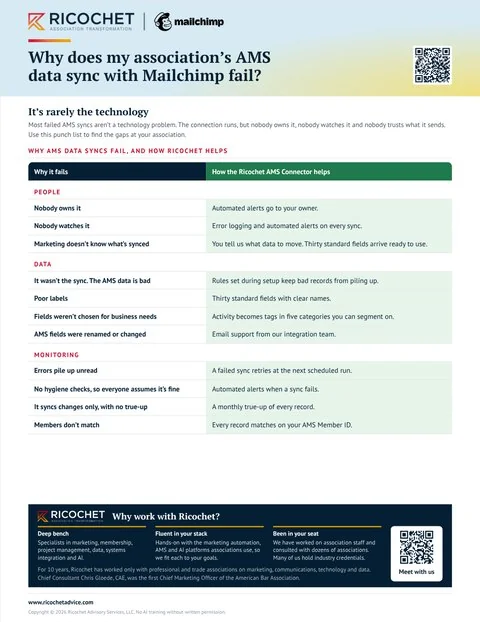
Preview of the guide Why does my association's AMS data sync with Mailchimp fail?
Free download
Why does my association’s AMS data sync with Mailchimp fail?

Which AMS platforms does it work with?

Nearly every AMS works, including heavily customized ones. Because the connector runs from scheduled exports rather than an API, cloud, legacy and custom systems all connect the same way. If you do not see yours listed below, just ask us.


  • Aptify
  • Euclid
  • Fonteva
  • GrowthZone
  • iMIS
  • MemberCentral
  • MemberClicks
  • netFORUM
  • Nimble AMS
  • Novi AMS
  • Personify
  • Protech
  • re:Members
  • Rhythm
  • Salesforce
  • Wild Apricot
  • YourMembership
  • Many more

What associations ask about the Mailchimp AMS Connector

What data does the connector sync?

The connector syncs up to thirty standard member fields covering identity, contact, professional, membership and demographic data, plus member activity as tags in up to five categories. Fields include names, contact details, membership status, join and expiration dates, and chapter. Activity tags cover in-person events, virtual events, donations, purchases, and education and certifications.

How does it handle registrations, purchases and donations?

The connector handles registrations and other transaction activity by turning it into clean tags you can segment on, rather than loading full transaction history into Mailchimp. Your AMS keeps the detail. Records match on your AMS Member ID, and tags can represent in-person and virtual events, donations, purchases, education and certifications.

How often does data sync?

Data syncs from once a day to near real time, depending on your subscription. Each evening you get a plain-language status report that lists every sync and any fix your staff need to make. Records are matched using your AMS Member ID, and common errors are healed and resubmitted.

How tech-savvy does our team need to be?

Your team does not need to be tech-savvy to use the connector. You tell Ricochet what data to move, and its specialists handle the rest. The connector syncs on your schedule, matching records on your AMS Member ID, while the daily status report spells out any fix your staff need to make.

What if our AMS has downtime?

If your AMS has downtime, the connector picks up the next scheduled export, and the daily status report shows what did not sync. Records match on your AMS Member ID, and a monthly true-up checks every record. Your AMS remains the system of record for full transaction detail.

How do we connect our AMS to Mailchimp?

Use a connector that syncs on a schedule instead of manual imports. The Ricochet Mailchimp AMS Connector moves up to thirty standard member fields and turns activity such as events, gifts and certifications into tags you can segment on. It works with nearly every AMS, matches records on your AMS Member ID and syncs from once a day to near real time, depending on your subscription.

Why do AMS syncs with Mailchimp fail?

Sometimes because of the technology and sometimes because nobody owns the sync. Many connectors on the market are fragile and break on a missing field or a merged record. Even a good connection fails when nobody watches it and errors pile up unread. The Ricochet Mailchimp AMS Connector sends a daily status report, heals records that fail and runs a monthly true-up of every record, matched on your AMS Member ID.

Let’s talk about your association

Bring your toughest question. We’ll help you find the next step.

Let’s talk