


What data moves from my AMS to HubSpot?
Contacts, companies, custom objects and the fields that matter. Each record is matched on your AMS Member ID, so duplicates do not pile up.

 Your AMS
What makes the Ricochet AMS Connector different?
You can’t find these features on other connection systems, or they require significant upgrades!
-

No AMS API required
Works from scheduled exports, so a thin or costly AMS API never holds you back.
-

Automated healing
Records that fail on a missing field, a format error or a merged ID are fixed and resubmitted for you.
-

Daily status report
One plain-English email each evening, with any fixes your staff need spelled out.
-
Unlimited fields
Every custom AMS field and custom object, with company-to-contact links kept.
-

Enterprise security
Built on SOC 2 Type II and ISO 27001 certified infrastructure, encrypted at rest and in transit. Exports are deleted after 10 days.
Which AMS Connector tier fits my association needs?
Four tiers, set by how often you sync, how many record types you move and how many HubSpot contacts you have.
| Lite | Standard | Advanced | Enterprise | |
|---|---|---|---|---|
| Sync direction | One way from AMS | One way from AMS | One way from AMS | Two ways |
| Sync frequency | Once a day | Up to twice a day | Up to four times a day | Near real time |
| AMS record types | Contacts only | Up to two | Up to three | More than three |
| AMS API | None | None | None | Yes |
| HubSpot subscription | Pro or Enterprise | Pro or Enterprise | Enterprise | Enterprise |
| HubSpot contacts | Up to 25,000 | Up to 50,000 | Over 50,000 | Over 50,000 |
| Response time | Three business days | Two business days | One business day | One business day |
| Support hours | 10 a year | 10 a year | 10 a year | 10 a year |
| AMS platforms | Nearly all | Nearly all | Nearly all | Select providers |
Which AMS platforms does it work with?
Nearly every AMS works, including heavily customized ones. Do not see yours? Ask us.














What do I get with the AMS Connector?
A done-for-you setup. Your IT team schedules the exports, Ricochet does everything else, and the connector runs on its own after launch.
- Real time campaignsWelcomes and renewals go out when members act.
- Reduced staff laborNo exporting, uploading or retyping member data.
- Trustworthy dataHubSpot matches your AMS, with bad records healed.
- No AMS API neededRuns from scheduled exports, so a thin or costly AMS API never holds you back.
What associations ask about the AMS Connector
Do we need an AMS API?
No, you do not need an AMS API. Lite, Standard, and Advanced work from scheduled exports from your AMS, so there is nothing to integrate. Your IT team schedules the exports, and Ricochet handles the rest of the setup. The connector then runs on its own after launch.
How often does data sync?
Data syncs from once a day to near real time, depending on your tier. Lite syncs once daily, Standard up to twice daily, Advanced up to four times daily, and Enterprise near real time. The tier also determines other connector settings, including sync direction and the number of AMS record types moved.
How do you prevent duplicate contacts?
The connector matches every record on a unique ID, usually the AMS Member ID, to prevent duplicate contacts. If records have merged IDs, the connector handles those automatically. Matching records this way keeps duplicate data from piling up in HubSpot and helps your association maintain a trustworthy view of member information.
Which Association Management Solutions does the Connector support?
Ricochet has built connectors for Aptify, Fonteva, GrowthZone, Higher Logic, iMIS, MemberClicks, MemberSuite, netFORUM, Nimble, Novi AMS, Personify, Protech, re:Members, Rhythm, Thrive, Wild Apricot, and YourMembership. Nearly all AMS platforms are compatible, including heavily customized implementations. Contact Ricochet to confirm your AMS.
Is the data sync one-way or two-way?
The data sync can be one-way or two-way. Most associations start with a one-way sync from their AMS to HubSpot, while the Connector can establish a two-way sync for select AMS solutions. The tier information lists one-way sync for Lite, Standard, and Advanced, with two-way sync available on Enterprise, subject to availability from select providers.
What data can be synced besides contact information?
The AMS Connector can sync most AMS data types beyond contact information, including membership status, renewal dates, event registrations, committee memberships, donation history, and certifications. It can also move companies, custom objects, and custom fields. Records are matched using the AMS Member ID, so your association’s HubSpot data can reflect important membership and activity details.
How is AMS Connector subscription pricing determined?
AMS Connector subscription pricing is determined by the tier that fits your association’s needs, based on synchronization volume and complexity. Tiers reflect how often data syncs, how many AMS record types move, and how many HubSpot contacts you have. The flexible options are intended to match what you need; contact Ricochet for detailed pricing.
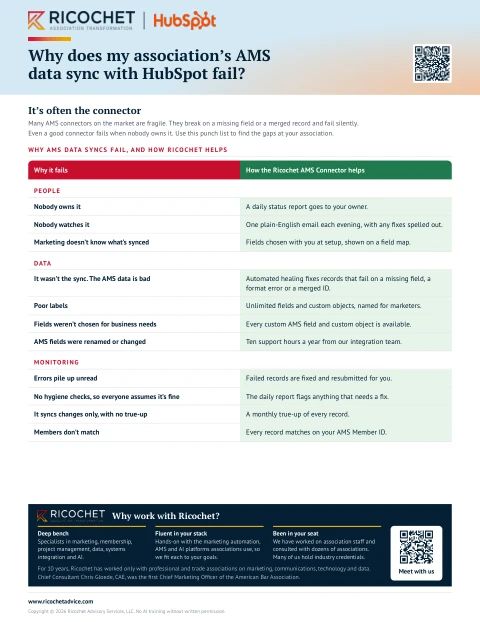
Why do AMS syncs with HubSpot fail?
Sometimes because of the technology and sometimes because nobody owns the sync. Many connectors on the market are fragile and break on a missing field or a merged record. Even a good connection fails when nobody watches it and errors pile up until staff stop trusting the data. The Ricochet AMS Connector sends a daily status report to your owner, heals records that fail, and runs a monthly true-up of every record, matched on your AMS Member ID.
Let’s talk about your association
Bring your toughest question. We’ll help you find the next step.
Let’s talk